SEO Audits
When a Referral Traffic Spike Is Not Growth: How to Investigate Suspicious GA4 Sessions
A spike in GA4 referral sessions does not always mean real growth. Learn how to inspect referral sources, investigate engagement patterns, validate tracking, and decide what action to take.
By Muhammed Lisan A ·
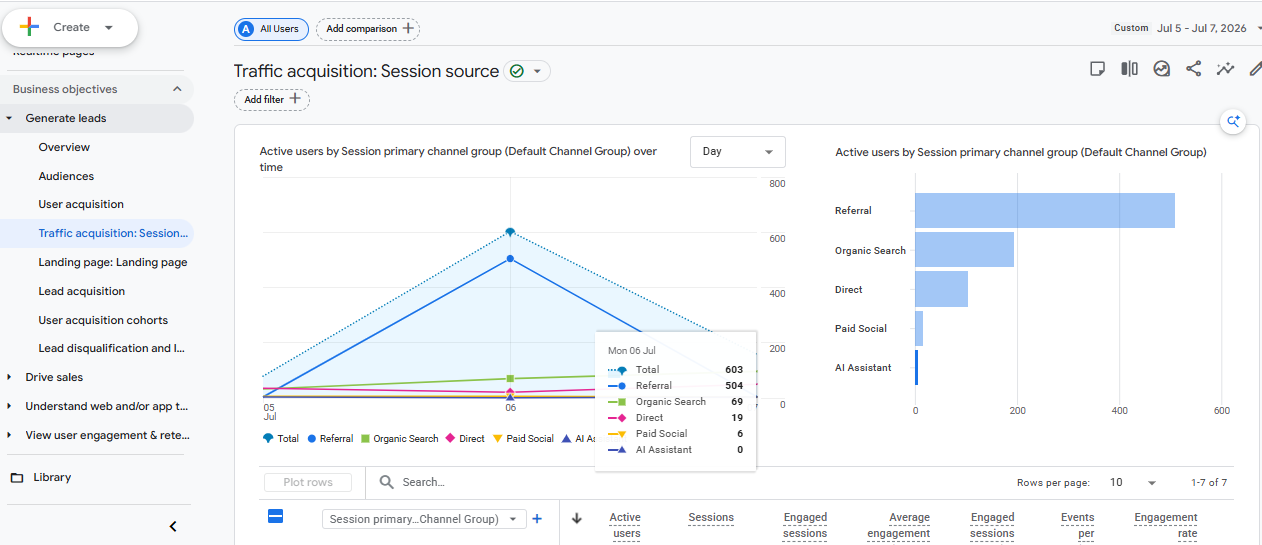
Picture a monthly report where referral sessions have jumped overnight. The line chart looks great. But enquiries haven't moved, engagement looks flat, and nobody can recall a campaign or press mention that would explain it.
(This scenario is hypothetical.)
The question is whether the site is attracting new visitors or just recording sessions that mean little. A spike is an observation, not a diagnosis. It might be a real mention, a campaign link, a tracking quirk, or automated activity. This guide walks through how to tell them apart with evidence.
The short answer: a referral spike is neither automatically growth nor automatically spam. Trace the source, compare engagement and outcomes, check your tracking, and look for independent evidence before you celebrate, dismiss, or exclude anything.
What counts as a referral traffic spike in GA4?
In Google Analytics, a referral is traffic that arrives through a link on another domain. Google's documentation says Analytics recognizes where traffic came from immediately before the visit and displays that domain as the referral source.
You'll usually find it in the Traffic acquisition report under Reports > Acquisition. Navigation can vary by property, and Google notes the report may have been removed from the default view, in which case an Editor can add it back.
Four dimensions matter here:
- Session default channel group: the report's default grouping (Direct, Organic Search, Referral, and so on).
- Session source: the publisher or site the session came from.
- Session medium: the method (for example, referral).
- Session source / medium: both combined.
Google marks these with the word "Session" because they describe how each session was acquired. That makes them the right dimensions when you're analysing session counts.
A spike is relative to your normal pattern. There is no universal session count that makes a source suspicious, so compare against a sensible baseline, such as the same weekdays or the same period last year.
It also helps to separate three ideas:
- Referral volume: how many sessions arrived.
- Traffic quality: what those sessions did.
- Business outcomes: whether enquiries, sales, or other goals followed.
Volume can rise while the other two stay flat.
Why a referral traffic spike may not represent genuine growth
These causes aren't equivalent, and several can overlap.
Automated or bot-like activity
GA4 automatically excludes known bots and spiders, identified through Google research and the IAB's international spiders and bots list. Google also says you can't disable this exclusion or see how much was removed. That's a limit worth stating plainly: excluding known bots doesn't mean every automated or suspicious interaction is caught.
Suspicious referral sources
An unfamiliar domain, a sudden high-volume referrer, or an odd source name deserves a closer look. But unfamiliar isn't the same as spam. Plenty of legitimate sites you've never heard of link to you.
Referral spam and measurement manipulation
(This part reflects common practitioner knowledge, not something in the Google pages used.) Some suspicious referrals appear in analytics without a real browser visit to your site, for example hits sent directly to the analytics endpoint with a fabricated referrer. Others may be real requests from automated tools. These are different situations, and a GA4 report on its own often can't tell which one you have.
Genuine referral traffic from a new source
A news mention, partner link, directory listing, newsletter, or social share can produce a real, legitimate spike. Verify before dismissing it.
Tracking or attribution changes
Redirects, URL shorteners, missing UTM parameters, cross-domain setups, and third-party tools can change how sessions are attributed. Google's page on (direct) / (none) traffic notes that redirects can strip UTM parameters and shorteners can remove referral details, so attribution can shift between channels without any change in real visitors.
Payment gateways and other business-controlled domains
A payment processor, or an email domain in a password-reset flow, can appear as a referral when users return to your site. Google lists these as typical unwanted referrals in multi-domain journeys. Check the actual implementation before drawing conclusions.
Don't exclude a domain just because it sends a lot of traffic or low engagement.
Step-by-step: how to investigate suspicious GA4 sessions
Step 1: Identify when the spike started
Set a comparison date range and look at the daily pattern. Did it start abruptly or build gradually? Check seasonality, recent campaigns, launches, newsletter sends, and site changes. Note the exact start date, because everything else gets compared to it.
Step 2: Find the source behind the increase
Open Reports > Acquisition > Traffic acquisition and switch the primary dimension to Session source / medium (or Session source). Sort by sessions, apply your comparison range, and identify which source accounts for most of the change. The report's search bar lets you filter to one source.
Step 3: Compare the source with engagement and key events
For that source, review:
- Sessions, engaged sessions, and engagement rate. GA4 counts a session as engaged if it lasted longer than 10 seconds (the default engagement timer, which can be adjusted), had at least one key event, or had two or more page or screen views.
- Average engagement time, event count, events per session, and key events or conversions.
A big session jump with almost no engagement and no key events deserves a closer look. But none of these alone proves the traffic is fake. A fast, useful answer can produce a short session.
Step 4: Examine landing pages and event patterns
Use the Landing page report to identify the first page of each session. Review Page path and screen class in the Pages and screens report or an exploration for pages visited during the session; it is not the same as the landing page. Ask:
- Did the sessions concentrate on one unexpected page?
- Do the event sequences look plausible for this site?
Don't assume every real visitor views multiple pages or stays a minimum time. Some visitors find what they need on one page.
Step 5: Check geography, device, browser, and hostname
Look at country, device category, browser, and the hostname dimension. Unusual concentrations or mismatched values may be worth investigating. Remember that legitimate campaigns can be geographically concentrated, and device or browser patterns are not proof of bots. Reporting thresholds and privacy protections can also limit what's visible.
Step 6: Look for real-world evidence
GA4 alone may not establish whether sessions are legitimate. Look for corroboration:
- The referring page or campaign itself.
- A new backlink or external mention.
- Form submissions, calls, or other enquiries.
- Server logs or CDN/WAF data, where available and authorised.
- CRM or transaction records.
- Recent changes to the analytics implementation.
Step 7: Verify the tracking implementation
Review recent changes to Google Tag Manager or the Google tag, redirects, cross-domain measurement, UTM usage, consent configuration, and third-party integrations. Separate tracking errors from suspicious external activity. A misconfigured redirect can create a "spike" with no new visitors.
Step 8: Classify the result and document the decision
Sort the evidence into one of four outcomes:
- Likely legitimate referral growth: corroborated by a real mention, campaign, or enquiries.
- Suspicious or potentially automated activity: supported by independent evidence such as server-level data.
- Attribution or tracking issue: traced to a configuration or implementation change.
- Inconclusive: more evidence needed.
Before you exclude or filter anything, save an export or screenshot of the original report and write down why you're acting.
A practical example: 500 referral sessions appear overnight
Everything below is hypothetical. It is not a client case, a verified incident, or a measured result.
A site normally gets a modest amount of referral traffic. One day a previously unseen source contributes about 500 sessions. Engagement and key events look unusually low, organic search performance hasn't changed, and nobody knows of a campaign or external promotion.
The investigation might run like this:
- Source: Traffic acquisition shows one source accounts for nearly all the increase, starting on a specific date.
- Dimensions: Compare engagement, event count, and key events for that source with other referral sources.
- Landing pages and events: Check whether the sessions hit one URL or spread across the site, and whether the event sequence looks plausible.
- Geography, device, hostname: See whether the pattern is concentrated or inconsistent with your audience.
- Implementation review: Check for recent tag, redirect, or cross-domain changes.
- External evidence: Look for the referring page, a backlink, enquiries, and server or CDN logs.
The conclusion depends on what you find:
- A legitimate publication that linked to you: real growth, even if engagement is modest. Treat it as an opportunity.
- A campaign or partner: attribute it correctly, and consider adding UTMs next time.
- A third-party integration or business-controlled domain: an attribution issue, and a case for the unwanted-referrals setting.
- Automated activity supported by server-level evidence: bring in the technical team.
- No corroboration either way: classify it as inconclusive, keep monitoring, and avoid acting on a hunch.
500 sessions or low engagement alone does not prove bot activity.
How to distinguish suspicious traffic from a genuine referral opportunity
| Signal | What it may indicate | What to verify |
|---|---|---|
| Sudden source-specific spike | A new promotion, external mention, automation, or tracking change | Source context and start date |
| Very low engagement | Low relevance, fast exits, automated activity, or measurement limitations | Landing pages, event data, and other evidence |
| No recorded conversions | Low-intent visits, a tracking issue, or suspicious activity | Conversion setup, CRM, and business records |
| Unexpected geography | A genuine audience, campaign targeting, or unusual traffic | Campaign details and other available signals |
| Referral appears after a site change | Attribution or cross-domain configuration issue | Tagging, redirects, and third-party flows |
| Sessions increase but business activity does not | Low-quality traffic or a conversion-measurement problem | Lead records, key-event tracking, and traffic source |
These are investigation clues, not classification rules. Several of them can appear together on perfectly legitimate traffic.
What to do after identifying suspicious traffic
- Preserve the original evidence. Export or screenshot the report and date range.
- Record the details: source, session pattern, affected landing pages, and what you found.
- Rule out legitimate causes. Confirm the source isn't a partner, campaign, publication, or payment flow.
- Fix confirmed tracking problems at the source: tags, redirects, cross-domain settings, UTMs.
- Use unwanted-referrals settings for what they're designed for. Google describes unwanted referrals as a way to stop specified domains being identified as referrals, mainly in multi-domain journeys. Matching events get ignore_referrer=true, and you can configure up to 50 per data stream. This changes attribution. It is not general bot filtering.
- Treat filters carefully. A report-level filter in Traffic acquisition only excludes sources from that report view; it does not delete collected data. Google documents a web hostname data filter for new incoming data, with a Testing state to validate matches first. Check its availability and exact settings in your property. An Active data filter makes permanent changes to incoming data, so use it only with evidence for the criteria, never as a reaction to low engagement.
- Don't expect retroactive repair. Google notes filters only apply to new data, and returning users can still be attributed to an earlier referrer under last-non-direct-click attribution.
- Escalate server-side evidence. If server logs or CDN/WAF data show a real automated-request problem, work with the technical team on appropriate mitigations.
- Monitor after any change.
Don't block a domain or exclude traffic solely because sessions show low engagement.
How suspicious referral traffic affects SEO reporting
An unexplained spike can distort several things a stakeholder reads:
- Total sessions and referral channel growth.
- Engagement rate and landing-page performance.
- Conversion rate (more sessions, same conversions).
- Channel comparisons and month-over-month trends.
Referral sessions in GA4 don't indicate that Google organic rankings have improved or declined. Analyse search performance separately: Google Search Console for visibility in Google Search, and GA4 for on-site behaviour and conversions. It's also worth avoiding the claim that suspicious referral traffic in GA4 damages rankings. It doesn't follow from the GA4 data.
If you want help setting up analytics reporting that connects traffic to business outcomes, see my SEO reporting and analytics services.
How to report the issue to a client or manager
This is a template, not a real client report.
What changed: Referral sessions rose from [baseline] to [number] between [dates]. Source: Most of the increase came from [source / medium]. What we reviewed: Engagement, key events, landing pages, geography, device, and recent tracking changes. Confirmed: [for example, the increase began on a specific date; no related campaign was running]. Not yet confirmed: Whether the sessions represent real visitors. [Reason.] Recommended next step: [for example, review server logs / confirm with partner / monitor for two weeks]. The original report has been saved so the data can be revisited.
Frequently asked questions
Why did referral traffic suddenly increase in GA4?
Common reasons are a new link or mention, a campaign or partner, a tracking or attribution change, or automated activity. The source report and your own context will show which.
How can I identify suspicious referral traffic in GA4?
Look at source / medium, engagement, landing pages, events, and geography together, then seek independent evidence. GA4 data alone can raise suspicion but rarely settles it.
Does low engagement rate mean referral traffic is spam?
No. It can signal low relevance, a fast answer, or a measurement issue. Treat it as a clue.
Does GA4 automatically exclude bot traffic?
It excludes known bots and spiders, but you can't disable this or see how much was excluded. It doesn't guarantee that all automated activity is removed.
How do I find the referral source responsible for a traffic spike?
In Traffic acquisition, use Session source / medium with a comparison date range, then sort by sessions.
Should I exclude suspicious referral domains in GA4?
Not by default. Confirm the cause first. Exclusion is justified for things like payment or business-controlled domains, or when you have clear evidence.
What is the difference between unwanted referrals and bot filtering?
Unwanted referrals stop specified domains being attributed as referrers. Known-bot exclusion automatically removes traffic from known bots and spiders. They solve different problems.
Can suspicious referral sessions affect SEO rankings?
Referral sessions recorded in GA4 aren't a ranking signal you can read from this data. Check Google Search Console for search performance.
How can I verify whether GA4 traffic represents real visitors?
Look for corroboration outside GA4: enquiries, CRM records, server logs, the referring page itself.
What should I check when referral sessions rise but conversions do not?
Check the source's relevance, landing pages, conversion and key-event setup, recent site changes, and whether lead or sales records tell a different story.
Conclusion
A sudden referral jump is not automatically growth, but it isn't automatically spam either. Identify the source and timing. Compare session and engagement patterns. Check landing pages and key events. Verify tracking and look for independent evidence. Apply a fix only once you reasonably understand the cause.
Investigate the quality of a spike before you celebrate it, and before you dismiss it.
References
- Google: Traffic acquisition report
- Google: Identify unwanted referrals
- Google: Known bot-traffic exclusion
- Google: Understand (direct) / (none) traffic
- Google: Filter web hostname traffic
- Google: Analytics Data API dimensions and metrics
- Google: Engagement rate and bounce rate
- Google: Pages and screens report

Written by Muhammed Lisan A
SEO & GEO Specialist in Kerala
Muhammed Lisan A publishes practical, evidence-based research on technical SEO, crawlability, and generative engine optimization (GEO). Based in Kerala, he focuses on how modern search engines and AI answer systems discover, index, and cite content.